01 · Forecast
Forecasts the wall
Derives a burn rate from your own history and says whether this window survives to its reset — and how long before it does not.
 QuotaBar
macOS menu bar · free & open source
QuotaBar watches your Claude Code, Codex, Grok and Gemini limits, learns how fast you actually work, and warns you while you can still do something about it.
macOS 13+ · universal · signed & notarised · no account
The problem
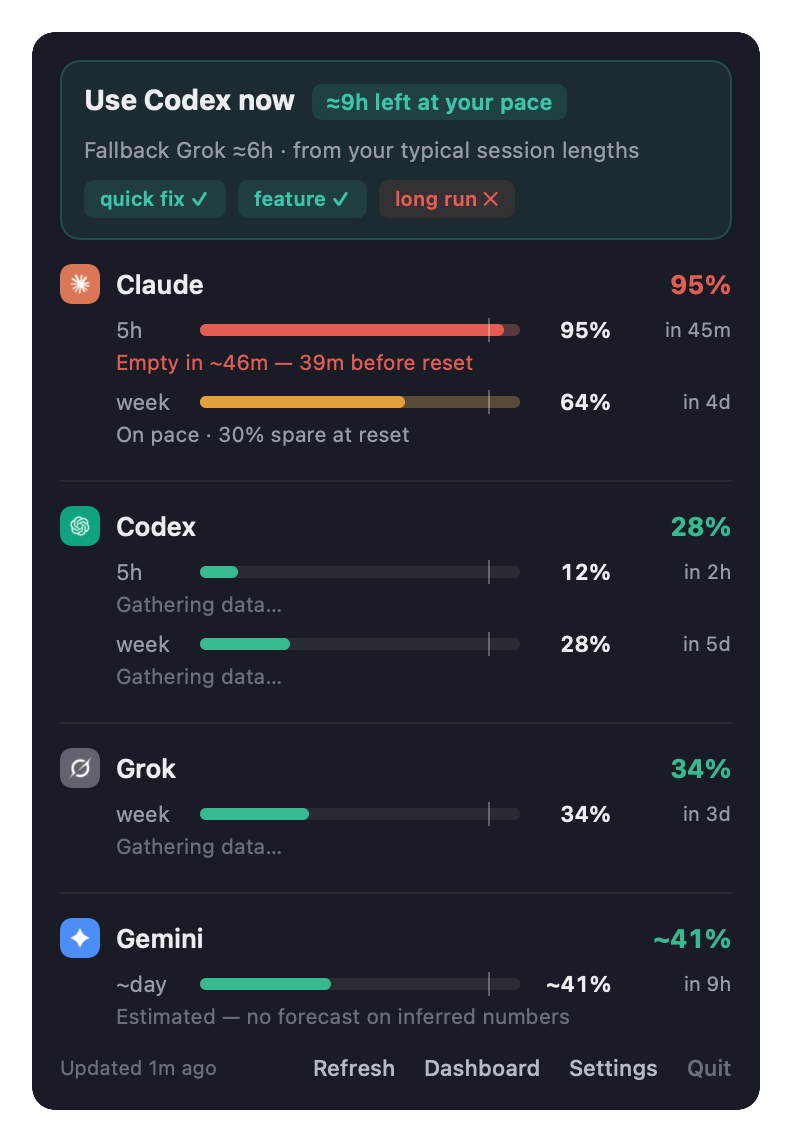
Knowing you are at 78% is useless on its own. QuotaBar records every reading, works out your burn rate, and answers the question you actually have.
Claude
  5h    ▓▓▓▓▓▓▓░  95%   resets in 45m
        Empty in ~40m — 39m before reset
        6.5%/h now · safe ≤4.1%/h

  week  ▓▓▓▓▓░░░  64%   resets in 4d 2h
        On pace · 30% spare at reset
        0.4%/h now · safe ≤2.1%/h

Use Codex now  ≈9h left at your pace
Fallback Grok ≈6h · from your typical session lengths
quick fix ✓  feature ✓  long run ✕
What it does
01 · Forecast
Derives a burn rate from your own history and says whether this window survives to its reset — and how long before it does not.
02 · Route
Ranks providers by hours of your typical work each still has, with a fallback named.
03 · Fit
Quick fix, feature, long run — sized from your own session lengths, not someone's idea of an average.
04 · Simulate
Say how long the work will take; every provider is projected against its live readings: fits, tight, or will not finish.
05 · Ledger
A read-only ledger of the instruction files, skills, agents, plugins and MCP servers entering your context, and the token cost each one carries.
06 · Handoff
Continuity Mode — optional, off by default — prepares a local handoff to a provider with spare capacity. See how it works ↓
Continuity Mode
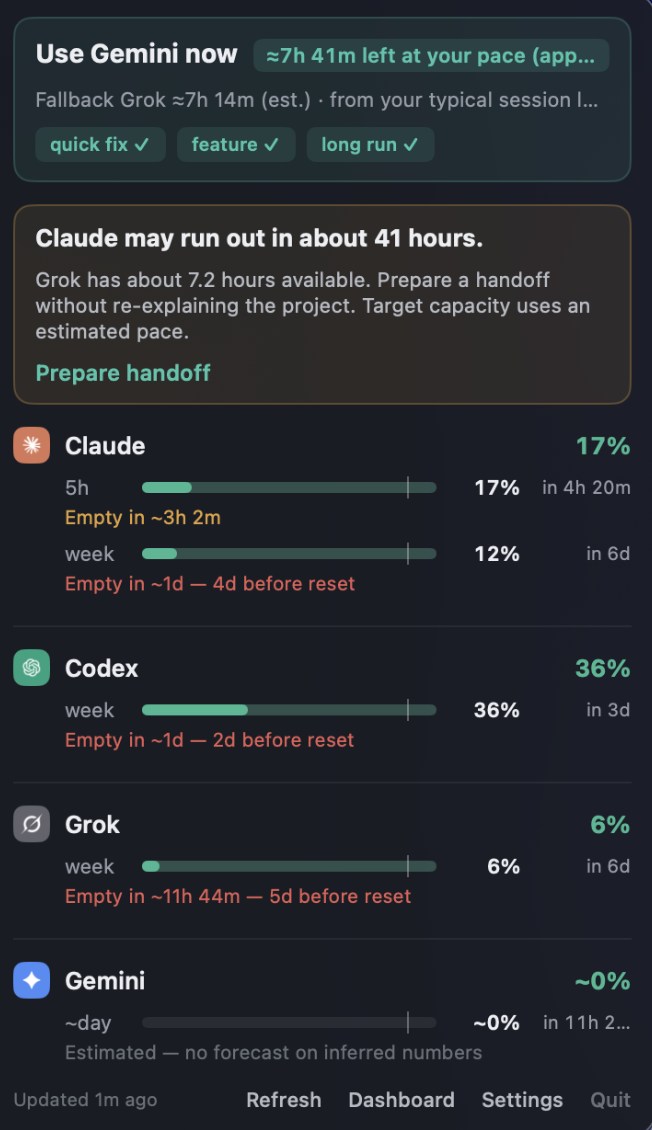
When a window is about to run dry, QuotaBar names the provider with spare capacity and prepares a local handoff from your recent Claude Code or Codex session — so the next CLI picks up without you re-explaining the project.
Optional, off by default. Nothing is prepared until you enable it and click Prepare handoff.
Entirely local. Message excerpts stay in memory, are never sent, and are never written into your repository.
Capacity-aware. The target is chosen from live readings — hours of your typical work left, not a guess.
Subscriptions
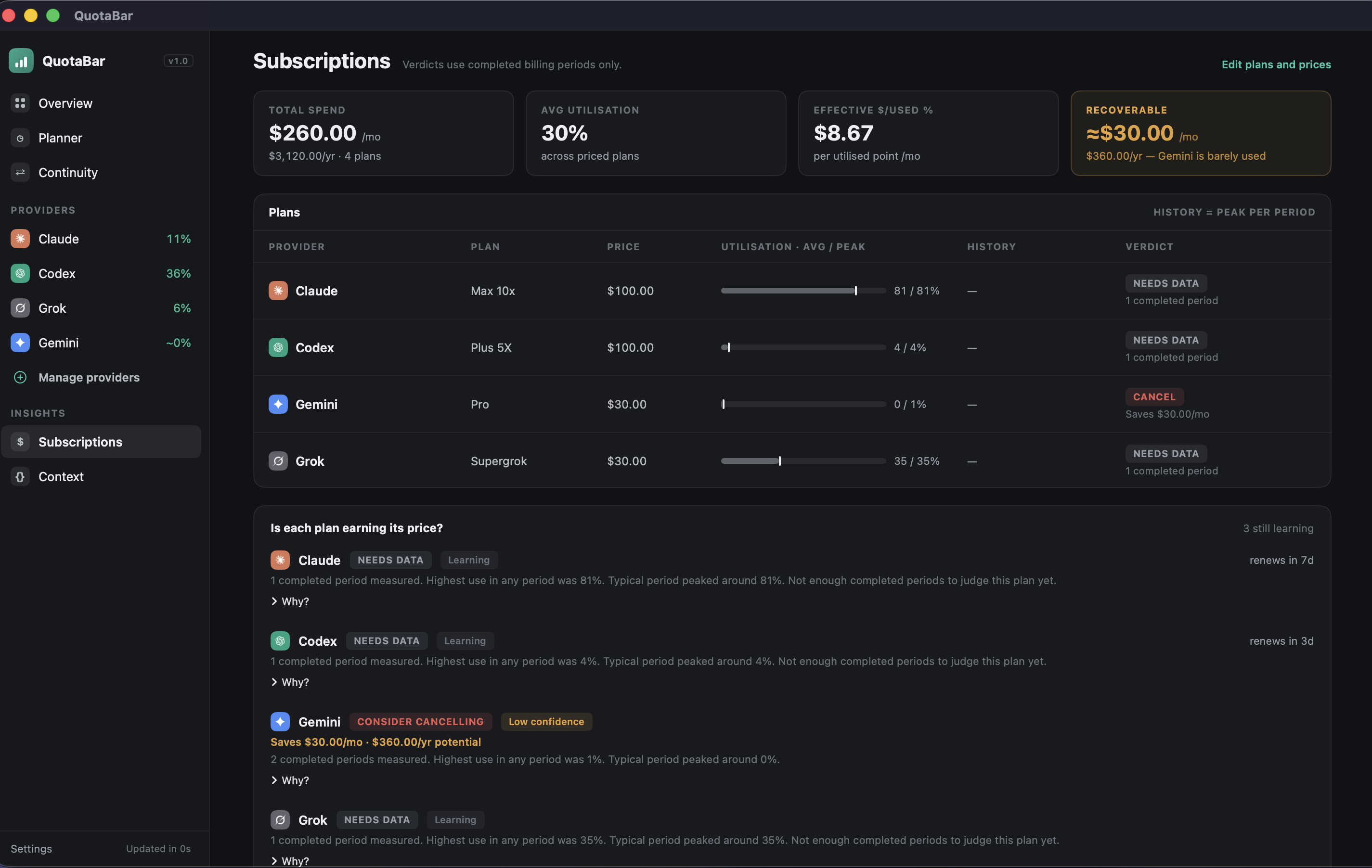
Peak and average utilisation across completed billing periods, with a verdict per plan: cancel, downgrade, keep or upgrade. Prices come only from what you enter — nothing is fetched or guessed.
Trust
No account, no telemetry, nothing to paste, and exactly one outbound host. Every claim below is one you can check yourself — and three of them take a single command.
There is no field anywhere in the app to type a secret into. It reads what your CLIs already stored. Open it and look.
Only Claude has a usage endpoint. Codex, Grok and Gemini are read from local files and make no network request at all.
sudo lsof -i -a -c QuotaBar
Read at request time, then discarded. The entire credential path is one file of about 175 lines.
git grep -n "accessToken"
The support export is built by inclusion, not filtering: tokens, headers, email addresses, home paths and your usage figures are all stripped, and it is pretty-printed so you can read it before sending.
Apple holds a verified identity for the developer and has scanned the binary.
codesign -dv --verbose=4 /Applications/QuotaBar.app
What it cannot promise. QuotaBar is not sandboxed — it cannot be, because reading another tool's Keychain item and logs is impossible under App Sandbox. That is also why it is not on the Mac App Store. The guarantee here is Apple's identity check plus your ability to read the source, not an OS-level cage. The full version, including what it gets wrong.
Install
Updates with brew upgrade --cask quotabar, or in-app.
A signed, notarised universal build. Drag it to Applications and open it — no Gatekeeper warnings, no right-click-to-open ritual.
If you would rather not trust anyone's binary, the source builds in three commands. That is the point of it being open.
QuotaBar is free. No trial, no licence key, no upsell. If it saves you a surprise rate limit and you want it to keep being maintained, chip in — entirely optional, and it changes nothing about the app.